
How to use job board multi-posting
What's included in this guide:
- From the Post the Job section of your job:
- Post to Job Boards
- Source Tracking
- List of Job Boards to post to
From the Post the Job section of your job
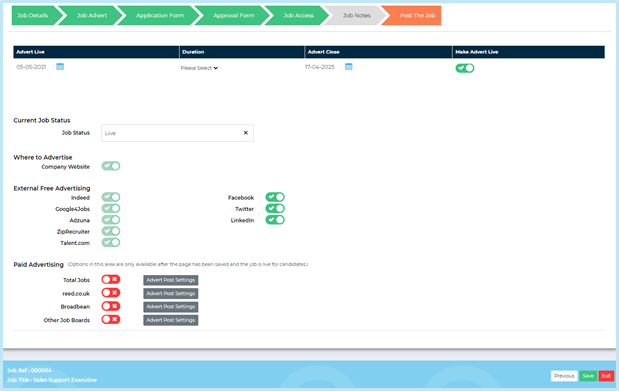
Ensure the Job Status is set to 'Live' and the job advert is enabled.
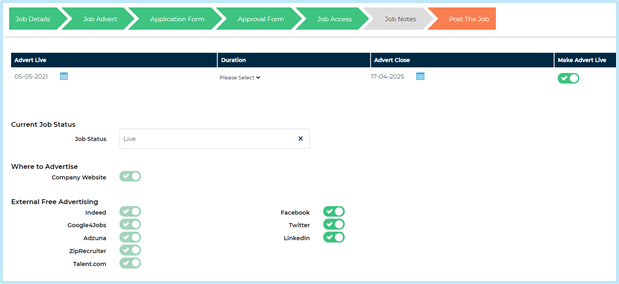
Post to Job Boards
Scroll down the page and toggle on against Other job boards and complete the fields below:
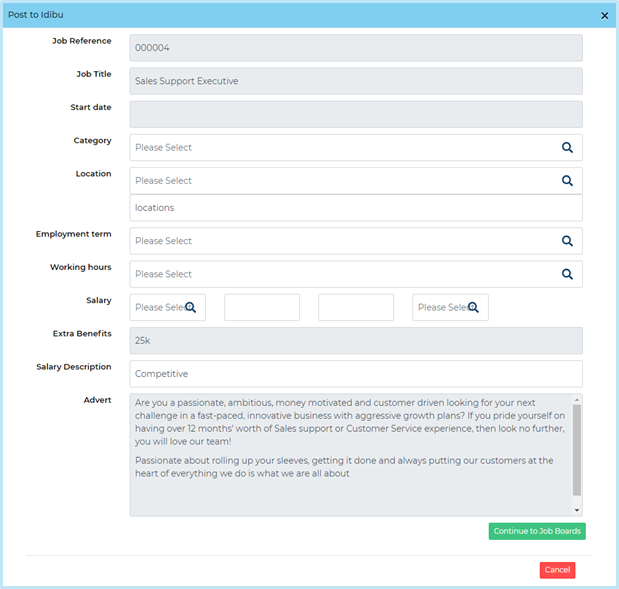
- Category: choose the exact or closest match category from the drop-down list. This is a generic multi-posting category list and is intended to match as closely as possible the specific job board categories
- Location: Select the relevant country, the specific location will pull through below from what has been selected on the Job Details page
- Employment term: add in the employment term
- Working hours: add in the working hours
- Salary: ensure the minimum/maximum fields show a salary value written as 50000 and 54000. This information pulls through to the job board and they will not accept the inclusion of symbols such as ‘£’ signs or commas
- Extra Benefits: Add in any extra benefits
- Salary Description: add the salary description e.g. £30,000. Note: if you need to advertise an hourly pay, please add this in the next section
- Advert: This is the advert wording that will be posted to the job boards. Don’t worry if you want to make changes to this you can do so on the next page
Did you know?Salary Description
Press Continue to Job Boards then Post the Job.
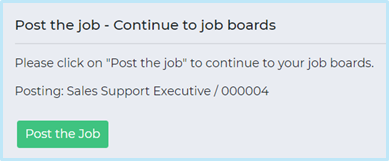
Continue to Job Boards
This page takes you to our posting partner to complete your job board set up.
- Select the site(s) you wish to 'Publish to' (use shift and your down arrow to select more than one)
- Ensure the Category has pulled across correctly
- Select the Location. In this example, Altrincham - Tabley Court was the location on the first page. By clicking on the field you are able to remove this and select a new location that is recognisable from a search perspective i.e. Altrincham, Greater Manchester. If a dropdown list doesn’t appear immediately, start to type the name of the location. This is important - if not completed an error message will appear on screen
- Ensure the Salary min/max fields show a salary value written as 50000 and 54000
- Remove or amend any detail that has pulled across into Salary Description
- Review your advert: this is the copy that will post to the job boards. Make any changes as necessary and select Publish
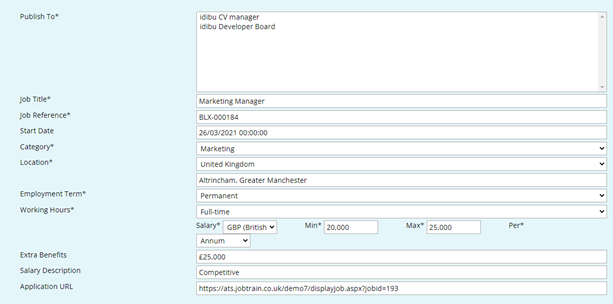
Posting to your Chosen Job Board(s)
This final page will display the sites you are posting to. Each site has a number of additional (mandatory fields) that need to be completed. These are specific to the job site that you are posting to.
Clicking show non-required fields presents additional fields that are non-mandatory
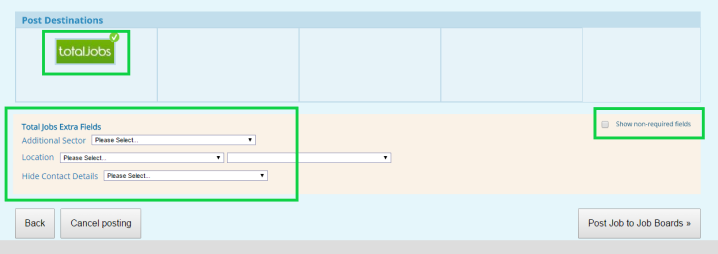
each timePost Job to Job Boards
Final Steps
Posting to your job boards is done independently of your careers website. Once you’ve completed the steps above your jobs will be posted instantaneously.
- To ensure that you have posted to your careers website, please revisit the Job Status tab and press Save
Source Tracking
All jobs posted through the steps above will automatically have source tracking tags applied. This will mean you can report on which candidates came from which job boards.
List of Job Boards to post to
Please click here: https://www.idibu.com/network/. You will be required to arrange agreements/purchases of adverts directly with each job board

(291 KB)