
What's included in this guide
- Overview
- Posting to NHS Jobs (the process)
- How to check if the integration has been successfully triggered
- Potential errors
- Update a draft vacancy on NHS Jobs
Overview
The NHS Jobs integration allows clients (who are already registered with NHS Jobs) to post vacancies directly from their Jobtrain platform to NHS Jobs and create a ‘draft vacancy’ on the NHS Jobs website.
To ‘publish’ the vacancy to https://www.jobs.nhs.uk users must log into their NHS Jobs account and ‘publish’ the draft vacancy.
This is a one-way integration, pushing job vacancy information to NHS Jobs.
As the NHS Jobs’ API does not support candidate applications, all candidates will be re-directed to apply for the job online (the source of 'NHS Jobs' will automatically be tracked against any applications received).
Posting to NHS Jobs (the process)
Once your vacancy is created in Jobtrain and advertised externally, select 'Post the Job > Post to NHS Jobs' to progress to the NHS Jobs vacancy info.
Jobs must be advertised externally before you can post the vacancy to NHS Jobs. If you attempt to progress to 'Post to NHS Jobs' & the vacancy is not Live or advertised externally, you will see a 'Please advertise the job externally before posting to NHS Jobs' prompt.
On the 'Post to NHS Jobs' page, there are a number of additional fields to complete to provide NHS Jobs with all of the vacancy info required to advertise on their site.
Where possible, fields auto-populate from elsewhere in Jobtrain, as follows:
| Job Title | Job Title for Candidates |
| Job Reference | Job Reference Number |
| Contract Type |
Where there is a match between your Jobtrain Employment Type field & the NHS Contract Type – this info will auto-populate.
If no match is found, you will need to select from the NHS Jobs dropdown. |
| Job Address | Job Location (the full address is editable in General Settings > Locations). |
| Job Overview | Advert > Social Media Attention Grabber |
| About Organisation |
About Organisation (a new field created for the NHS Jobs integration, found in Settings > System Customisation > Other) |
| Job Description (detailed) | Advert text |
| Contact Details (Email) |
Reply to Email Address (found in Job Details if enabled, or this may have been defaulted to your Recruitment inbox) |
Fields will auto-populate where possible, however you can over-type the information on the Post the Job page to correct any issues with the info.
- You will notice that as you complete the 'Post to NHS Jobs' info, fields may appear / disappear depending upon your selections already made (e.g. if you select the contract type is fixed term, a contract duration field will appear)
- Complete the vacancy fields presented
- On-screen direction is provided to guide you into providing the information that NHS Jobs requires
- A number of fields (e.g. Job Description Summary) have both minimum and maximum character limits – to guide you into providing the correct text length, an on-screen counter will appear as you type to prompt you to add more/less information
As there is a lot of information required for NHS Jobs, you may wish to part-save the information on the NHS Jobs tab and return to complete later.
You can do this by selecting the 'Save as Draft' button at the bottom of the page.
- When you have completed all of the vacancy information, select the 'Post the Job' button at the bottom of the page.
How to check if the integration has been successfully triggered
Where NHS Jobs accepts the data transferred, you will receive the following 'Job Successfully Posted' message:
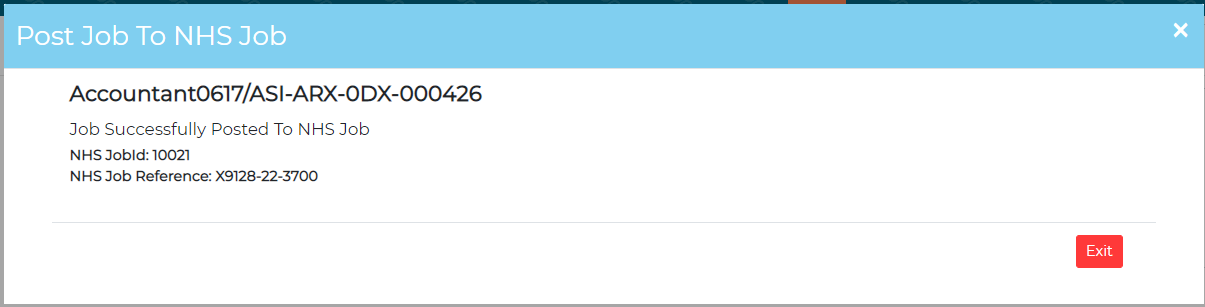
IMPORTANT: The NHS Jobs integration only supports the posting of a 'Draft Vacancy' to NHS Jobs - there is a further step required to log into your NHS Jobs account, review the job information transferred and 'Publish' the vacancy on NHS Jobs.
Once published on NHS Jobs, candidates then can search and find the vacancy on the NHS Jobs website.
Candidates will be re-directed to your Jobtrain candidate site to apply for the job and will complete your application process as per your Jobtrain setup.
Potential errors
| Error message | How to resolve |
| "Please fill the required fields" | This means that you have missed a mandatory field – go back and check that you have completed all required information. |
| "You have exceeded the words max limit, max limit is 1000" | You have added too many characters into one of the text fields – please review your entry and reduce the words/characters until you do not see this error. |
| "Please Enter <<field name>>. Character minLength: 100, maxLength: 1000." | You have added too few characters into one of the text fields – please add more content until this warning prompt disappears. |
| 400 Error: Bad Request | This means that NHS Jobs has rejected some of the data that you have entered – please refer to the 'field' listed in the error message to identify which field NHS Jobs have rejected - re-enter the information in a different format and try again. |
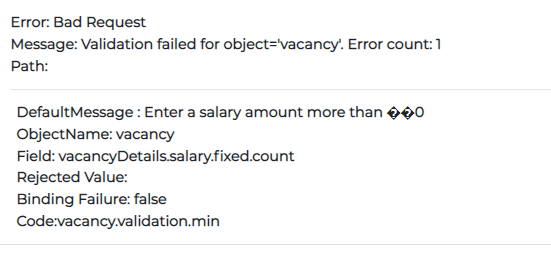 |
The salary you have entered is not valid. Please review the salary information and re-enter. |
| 401 / 403 Errors | This would indicate a problem contacting the NHS Jobs system – please raise with Jobtrain Support who will check the integration configuration and 'Org ID / Account ID' is correct and liaise with NHS Jobs to resolve. |
Update a draft vacancy on NHS Jobs
If there is a change to the vacancy details, these can be updated on NHS Jobs by using the 'Update' button.
Simply make your changes to the 'Post to NHS Jobs' page and select 'Update'.
NOTE: NHS Jobs only allow changes to the vacancy details via the integration whilst the vacancy remains in a 'Draft' status on NHS Jobs. If you have already published the vacancy on NHS Jobs, you must edit within your NHS Jobs account.
FAQs
Can advert supporting documents be sent with the advert content?
No, at present supporting documents are not included in the Jobtrain/NHS Jobs integration.
Can I create a job from my NHS Jobs login and direct candidates to apply via Jobtrain?
No. If the vacancy wasn't created via Jobtrain, the applicant would be directed to NHS Jobs to apply and to complete recruitment activity within NHS Jobs.
Can I advertise the job in multiple locations?
No, only the primary job location can be added at present. If your job can be based in multiple applications, we would recommend adding this detail into your advert copy.
How can I edit a vacancy that is already published to NHS Jobs?
You can edit the job from your NHS Jobs account, however any changes that you make will not update the vacancy details in Jobtrain.
Alternatively, in Jobtrain, you could copy the job, make any necessary changes, and post the newly created vacancy to NHS Jobs.