
I want to:
- Know the benefits of the integration
- Understand how the integration works
- Find out how to get the integration switched on
What is Care Friends?
Care Friends is an employee referral app built for the care sector. Your existing staff use the app to refer people they know for your open jobs. Referrals arrive in Jobtrain as new applications, and candidate progress is sent back to the app so referrers can follow what happens next.
What the Care Friends integration gives you
The integration connects your Care Friends account to Jobtrain so referrals become applications without manual data entry.
- Tap your workforce: Turn every employee into an active recruitment channel with a simple, engaging app.
- Better quality candidates: Improving candidate quality through trusted personal recommendations.
- No extra admin: Applications flow into Jobtrain automatically, no manual data entry.
- Full visibility: Source tracking shows exactly which applications came from Care Friends.
- Gamified and mobile-first: Staff earn points and rewards for successful referrals, and referrers and candidates interact through a smartphone app.
- Real-time progress tracking: Referrers see where their candidate is in the hiring process.
How the Care Friends integration works
Once the integration is switched on, referrals flow between Care Friends and Jobtrain automatically. Your live jobs sync into the Care Friends app, staff share them with people they know, and each expression of interest arrives in Jobtrain as a new application for you to progress as normal.
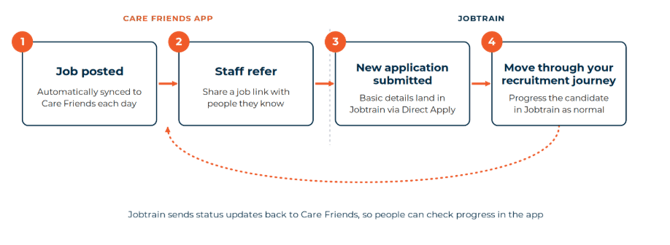
Step 1: Job posted
- Care Friends pulls your live, externally advertised jobs from Jobtrain through the Jobtrain API.
- Jobs are filtered by location and status, so only relevant jobs appear in the Care Friends app.
- Jobs sync automatically on a daily schedule. A manual re-sync can also be triggered at any time.
Step 2: Staff refer
- Your staff share a job link with people they know.
- The candidate selects the link, views the job and completes a short expression of interest form. The form captures first name, last name, email address, contact number and postcode.
Step 3: New application submitted
- When a referred candidate completes the expression of interest form, their details are submitted into Jobtrain through Direct Apply.
- The application is created as a 1st stage application, with Care Friends recorded as the source.
Direct Apply means Care Friends referrals skip your standard Jobtrain application form and screening questions. Referrals arrive with basic details only, so invite the candidate to complete your 2nd stage application form to gather anything further you need.
Step 4: Move through your recruitment journey
- Progress the candidate through Jobtrain exactly as you would any other application.
- Care Friends checks Jobtrain periodically for updates to application statuses, so a change in Jobtrain (for example shortlisted, interviewed or hired) is reflected in the Care Friends app.
- Referrers see that progress and earn rewards based on outcomes, which keeps them engaged.
Who does what
|
Who |
Involvement |
|
Recruiter |
|
|
Candidate |
|
|
Referrer (your staff) |
|
What's automated and what you control
Care Friends handles the referral workflow automatically, while giving you control over which jobs are visible and how candidates are processed.
|
Area |
What's automated |
What you control |
|
Job sync |
Live jobs sync from Jobtrain to Care Friends daily |
Which locations and job statuses sync across |
|
Candidate submission |
Referred candidates are pushed into Jobtrain as Direct Apply applications |
Nothing, this happens for you |
|
Status updates |
Progress syncs back to Care Friends automatically once you move a candidate through application statuses in Jobtrain |
How you progress each candidate through your recruitment workflow |
Getting the Care Friends integration switched on
Start with your Jobtrain Account Manager. They arrange a 30-minute consultation call with the Jobtrain Product team and Care Friends to talk through what the integration involves, whether you already have a Care Friends account or are considering one for the first time.
- Contact your Jobtrain Account Manager. They arrange a 30 minute consultation call with the Jobtrain Product team and Care Friends.
- Jobtrain enables the Jobtrain API and Direct Apply on your account. In practice, this means Jobtrain and Care Friends can exchange job and application data automatically, and referrals can land directly in Jobtrain as new applications.
- Credentials are shared securely between Jobtrain and Care Friends to complete the connection.
- Your staff can start referring candidates.
FAQs
Do I need my own Care Friends account?
Yes. The integration connects Jobtrain to an existing Care Friends account, it does not set one up for you. If you do not have an account, speak to your Jobtrain Account Manager and they will arrange a consultation call with the Jobtrain Product team and Care Friends.
Will I need to screen these candidates myself?
Care Friends referrals arrive through Direct Apply with first name, last name, email address, contact number and postcode only, bypassing your standard Jobtrain screening questions. Use your 2nd stage application form to gather anything else you need.
Will this affect how I post jobs in Jobtrain?
No. Continue posting jobs as normal. Care Friends pulls live, externally advertised jobs automatically.
How do I know which candidates came from Care Friends?
Applications are source tracked, so Care Friends appears as the source in your candidate reports.
Do I need to log into Care Friends day-to-day?
No. Applications arrive in Jobtrain as usual. The Care Friends app is used by your staff and referred candidates.