
Before you start
- Your organisation must have opted into using Jobtrain’s AI functionality
- Your user profile must have access to create assessment forms
- Your user profile must have access to recommend questions using AI enabled.
Use AI to recommend assessment / shortlisting questions from the Question Bank
In Settings > Assessment Forms >
1. Select New form (or open an existing form)
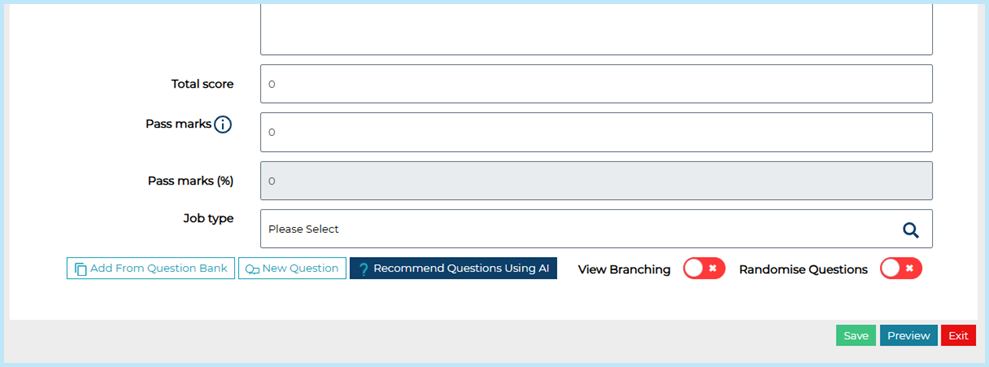
2. Select Recommend Questions Using AI
- Use Existing Job – to look up and choose the external advert content of an existing vacancy to base your question recommendation on.
Or
- Describe Job – type the job description that you want question recommendations for.
3. Select Send.
- The AI Question Recommendation tool will compare your existing Question Bank questions with the job description entered and recommend appropriate questions.
- Select Preview to view the recommended question(s).
4. Select the checkbox and Add the question to your form.
Use AI to generate new assessment / shortlisting questions
- If there aren’t any appropriate questions in your Question Bank, select the ‘Generate some using AI’ link to generate new shortlisting form questions using AI.
- Choose what type of questions you want to generate from the question type dropdown (i.e. yes/no, text etc.).
- Click Next – AI proposes 5 new questions.
- Select the questions you like and click Next
- AI will try to automatically detect the required response type, however if it isn’t able to do this confidently, you may need to select the question type from a dropdown menu.
- The questions will be displayed on your form, where you can edit the question details (make mandatory, assign scoring etc.)
- Remember to Save your form.