
Not every candidate will have the documents needed for a digital identity check for DBS, an in-date biometric passport, for example.
In these cases, a manual DBS check lets you verify the candidate's identity yourself, in person, while TrustID still manages the DBS application.
Jobtrain's TrustID integration gives you this as a built-in route, without needing to go outside the system.
Before you begin
TrustID must be enabled in your system. Contact our support team to request activation.
I want to:
- Start a DBS check for a candidate who doesn't have valid ID for a digital identity check
- Know when a candidate's manual check needs my input
- Complete a manual identity verification correctly
- Understand what happens after I've verified a candidate's identity
- Find a candidate's DBS results once the check is complete
- The candidate completes their personal information, address history and DBS questions in TrustID.
About manual DBS checks
Use a manual DBS check when a candidate cannot complete an eligible digital identity check.
How it works
- The candidate completes their personal information, address history and DBS questions in TrustID.
- The check updates to Intervention Required in Jobtrain, prompting the authorised user to verify the candidate's identity against the correct documents. This step is mandatory and cannot be skipped.
- Once identity is verified, the user completes a confirmation form in Jobtrain. This tells TrustID that verification is complete, so it can submit the DBS application.
Video: How to start and complete manual DBS checks
Starting and completing a manual DBS check
-
Go to the list of candidates page for your job and select Employment Checks from the left-hand actions menu
-
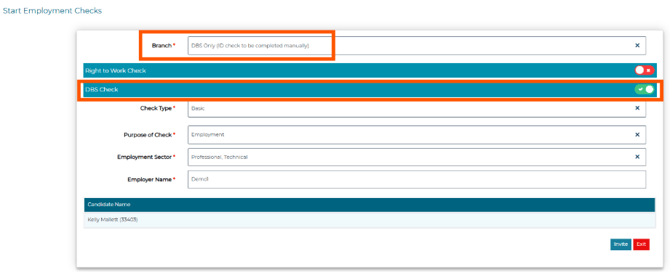
Select DBS Only (ID check to be completed manually) from the Branch dropdown. This tells TrustID to run the manual verification route for this candidate
-
Toggle on DBS Check and complete any mandatory fields:
-
Select Invite
-
The candidate’s application status updates automatically to Identity check started and their identity check progress to application submitted:

-
The candidate will receive an email directly from TrustID, with instructions to follow.
- If the candidate indicates that they have a Passport or Irish passport card, Trust ID will proceed with a Digital ID check process.
- However, where the candidate indicates that they have ‘None of these’ documents, they will be asked questions about their name and address history.
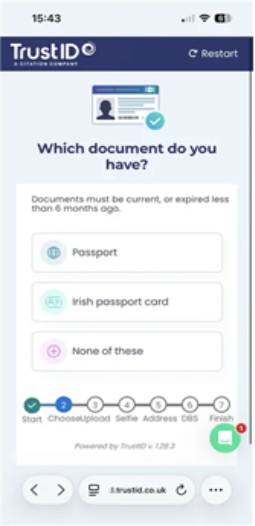
- Once the candidate submits their information, their application status in Jobtrain automatically updates to Intervention Required:

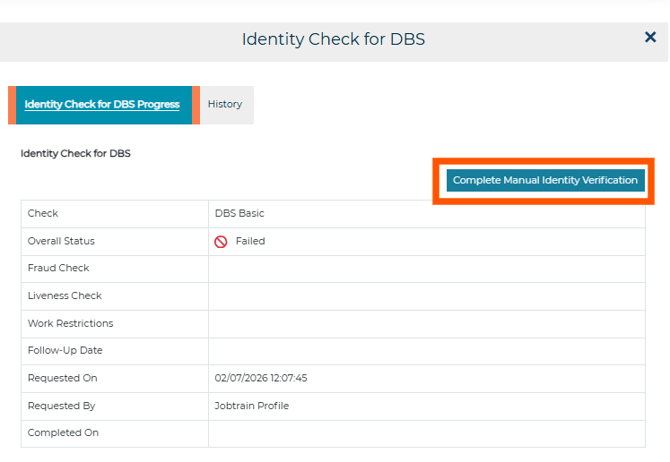
The user who started the check receives an email notification that manual verification is now needed. - Select the 3 dots against the More tab within the candidate’s application, select Identity Check for DBS, then select Complete Manual Verification:
- In the form, confirm you have physically checked each of the following:
- The candidate's original identity documents
- Proof of address dated within the last 90 days
- The candidate's date of birth - Any other documentation relevant to the identity check:
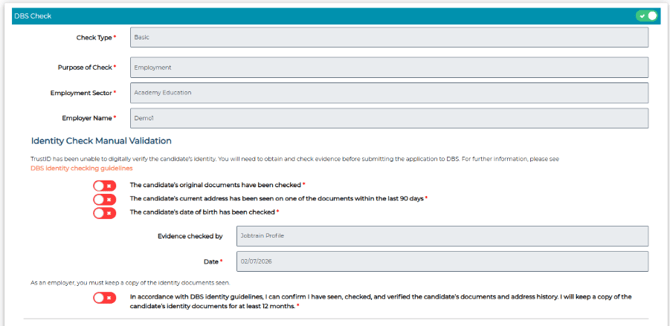
- Select Invite to confirm verification is complete
- Once verification is confirmed, the check moves to the next DBS processing stage. Where submission is handled automatically, no further action is required from you. The candidate's status automatically updates to Online Disclosure Request status (or your equivalent label).
Getting the results
Once the DBS application has been processed, the candidate's status automatically updates to DBS Check Complete.

The results return directly to the candidate's record in Jobtrain, there's nothing to retrieve separately or chase from TrustID.
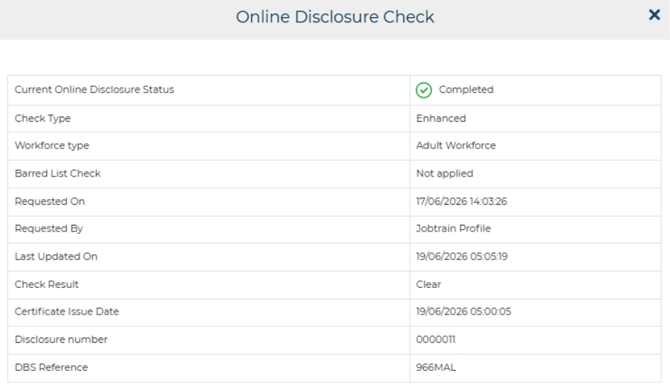
Select the 3 dots next to the More tab within the candidate’s application and choose Online Disclosure Check to view the result.
Tracking your employment checks
All your employment checks, including manual DBS checks, can be managed and tracked in one place via the Onboarding Hub > Employment Checks tab:

Understanding icons and statuses
|
Icon |
Status |
Description |
What should you do? |
|
|
Application Submitted |
Candidate has been invited to complete DBS questions |
Wait for candidate |
|
|
Intervention required |
Candidate has completed their address history and DBS questions |
Complete an offline identity check and follow the manual verification steps. |
|
|
Pending |
Waiting for Identity Check to be completed before the DBS can start |
No action needed yet |
|
|
Check Complete |
DBS check complete and result returned |
You can now review DBS information in Jobtrain |


FAQS
Why has the candidate been asked to upload identity documents when I selected the manual DBS option?
Selecting DBS Only (ID check to be completed manually) allows TrustID to use the appropriate DBS process for the candidate.
TrustID will first ask whether the candidate has suitable documents for digital identity verification. If they have an eligible passport or Irish passport card, they may be asked to capture their document and complete the digital identity check.
If they select None of these, they will not be asked to upload identity documents. They will complete their personal details, address history and DBS questions before the check is passed back to you for manual identity verification.
Does the candidate need to do anything differently?
The candidate will still receive an email from TrustID and will need to provide the information required for their DBS application.
Their journey then depends on the documents they have:
- If they have an eligible passport or Irish passport card, TrustID may take them through digital identity verification.
- If they do not have an eligible document, they will complete their personal details, address history and DBS questions without uploading identity documents.
Once the candidate has completed their part, you will need to verify their identity manually before the DBS application can proceed.
Why has the candidate’s status updated to Intervention Required?
Intervention Required means that the candidate has completed their part of the process, but their identity could not be verified digitally and must now be verified by you.
This is an expected and mandatory stage of the manual DBS route. It does not mean that the check has failed or that anything has gone wrong.
You must check the candidate’s identity and supporting documents and then complete the manual verification in Jobtrain. The DBS application cannot be submitted until this has been completed, as identity verification must take place before the application progresses.
Can I change from a digital check to a manual check after sending the invitation?
You cannot change the verification route within an existing check.
If the candidate has not completed their current check, you can cancel it and start a new one using the DBS Only (ID check to be completed manually) branch.
If the candidate has already completed digital identity verification, the check cannot be restarted using the manual route.
I’ve followed the guidance notes and have some further questions.
For any questions about using TrustID (or any other Jobtrain functionality), please contact our support team on +44(0)161 850 2004.