
Being integrated with a specialist DBS checking tool allows you to carry out crucially important DBS checking online, direct from within your Jobtrain platform.
Via Jobtrain, candidates can be registered for new Online Disclosure applications with First Advantage. A First Advantage user account will be created for the candidate to log into Online Disclosures in order to complete their DBS application – the application will then follow the usual process for verifying and countersigning.
At any time during the application process, you can check the status of the DBS application within Jobtrain (after an application is complete this will also display the returned disclosure details).
What's included in this guide:
- Video guide to DBS Checking
- Triggering a New Candidate Disclosure Request
- Monitoring the Online Disclosure Process
- Outcome of the Online Disclosure
- Controlling which System Users can request a Disclosure
- Updating PINs / Branch Names
- FAQs
Video guide to DBS Checking
If you’d prefer to watch a video introduction to our DBS Checking integration, no problem, just follow the link below:
Triggering a new candidate disclosure request
Either from the candidate’s record or from the list of candidates page (within the relevant job) select Employment Checks and then Start DBS Check from the left-hand menu.

A window will appear where you can choose the appropriate PIN (GB Group PIN / (Branch)). When the PIN has been selected, press Invite.
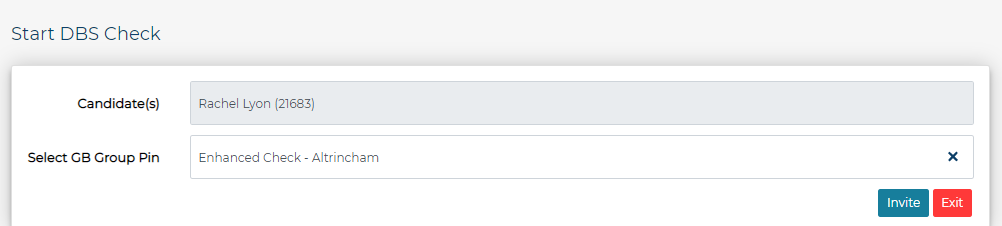
The Jobtrain candidate status will automatically update to Invite to Online Disclosure Request and details of the candidate(s) requiring a DBS Check will be passed onto First Advantage. First Advantage will then email the candidate directly with instructions of what to do next to complete the Online Disclosure application.
Monitoring the online disclosure process
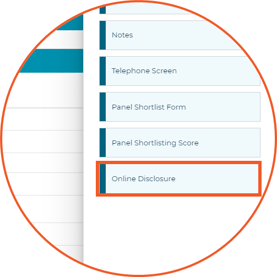
The candidate's Online Disclosure status will be displayed within their candidate record. Select More then Online Disclosure from the available options.
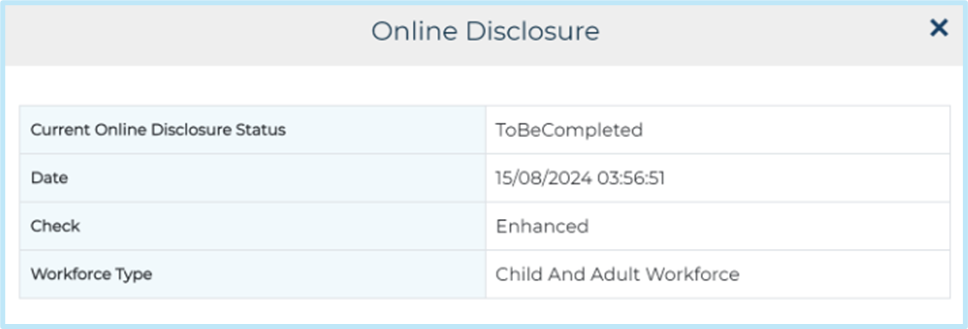
If candidates have had a DBS Check requested but haven't finished the Online Disclosure application yet, their status will show as ToBeCompleted. This will include the date the check was requested along with information about the check and its type.
When a candidate has completed the online disclosure application, this will then need to be verified before the online disclosure checks commence.
Verifiers will still need to enter First Advantage's Online Disclosures system to review and verify the documents which the candidate has provided.
The Verifier Name and Date will appear in Jobtrain once the candidate documents have been verified
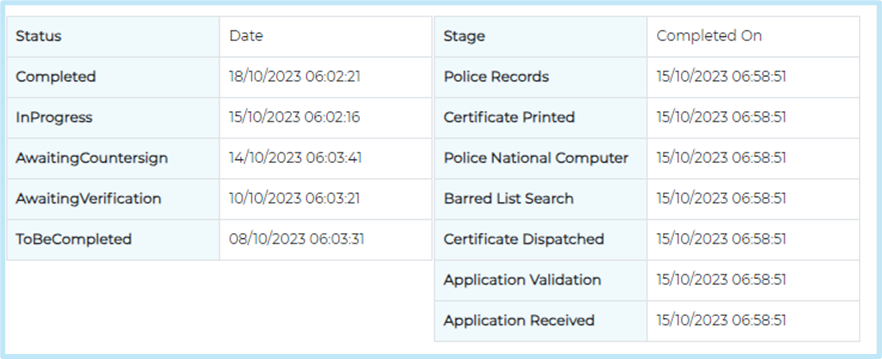
Additional rows will appear in the online disclosure page as each step of the process is completed.
Outcome of the online disclosure
When the check has been fully completed, the candidate's application status will be automatically updated to reflect "Online Disclosure Request Completed" as configured within your platform.
Additionally, the Online Disclosure section of the candidate record will automatically update to reflect the following information:
- Current Online Disclosure Status: This will display as Disclosure Complete
- Check Result
- Certificate Issue Date
- Disclosure Number
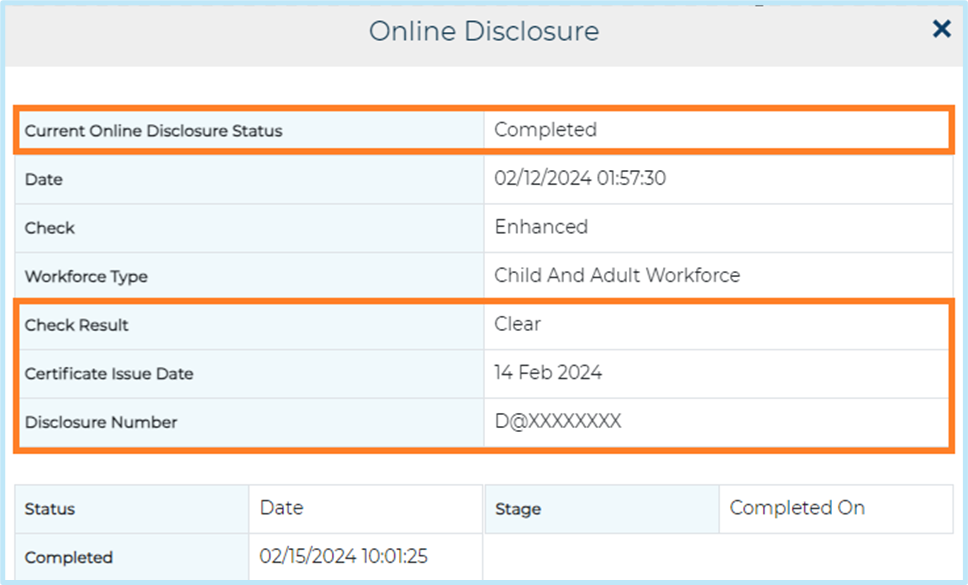
You can then login to First Advantage to review the full details of the DBS check.
Did you know? Merge fields can be inserted into email templates to populate the Disclosure Outcome, Certificate Issued On, and Disclosure Number once the necessary checks have been completed.
The merge fields can be accessed in the standard merge field reference table within email templates.
Controlling which system users can request a disclosure
Access to this feature can be controlled via Security roles.
To enable/disable access to the Online Disclosure functionality, got to System Settings > Security Roles. Select the Security Role you would like to edit.
Select the Jobs & Talent Pools tab and find the two options below.
- To allow a Security Role to start a DBS Check, check the boxes against the List Candidate – Start DBS Check option.

- To allow a Security Role access to the tab in a candidate’s record displaying the application progress, check the boxes against the List Candidate – Online Disclosure option.

Updating PINs / branch names
To view or edit your PINs, go to Settings > General Settings and select the GB Group Pins Tile.
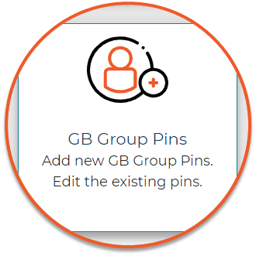
- To create a new PIN, select New GB Pin. Give the Pin a name that users will be able to identify, add the pin and press Save.
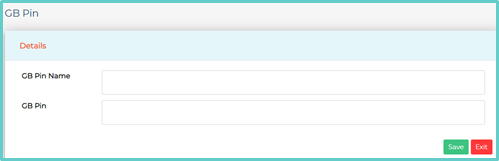
- To edit an existing PIN, select the Pin Name, update the information then press Save.
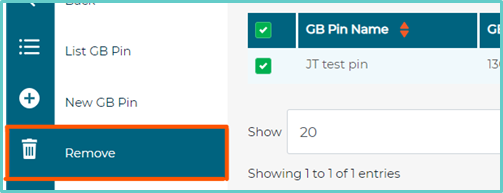
- To remove an existing PIN, check the box against the relevant Pin name and select Remove from the left-hand menu.
FAQs
How is an account created for the candidate to use the First Advantage platform?
First Advantage name the candidate's account their 'person profile' this is initiated by the Jobtrain and then confirmed when the candidate has accessed the account and created a password. This gives the candidate the ability to progress and complete an application.
It's worth noting that once the candidate has completed their application they won’t see any other information.
Is the candidate’s account deleted after a period of inactivity?
Their account becomes inactive after 6 months of no logging in. Accounts can’t be deleted, and information is removed in line with the data retention policy.
How long will First Advantage hold the data that candidates supply to make their application?
If the candidate completes their application all data will be kept in line with First Advantage’s Data Retention Policy – 6 months for all info and check result, 36 months for just personal information and no check result. Complete data deletion after 36 months.
If a candidate doesn’t complete an application they keep the information that was provided for 6 months and then it is completely removed.
Once the application has been submitted in First Advantage, can you still see the application data?
Yes absolutely, initially the application will come back to you to be verified and you’ll see that there is a link on the page (within First Advantage) that allows you to see applicant data that has been supplied, this is also available once the check has been completed through the results page.
Once the ID has been verified on the system can you still see this data?
No, once the application has been verified First Advantage remove that information from the form.
Does First Advantage portal have an auto log out functionality should the site be left unattended?
Yes, the system has an auto log out feature that sends the user back to the log in page after 15 minutes of inactivity. They will get a warning on screen at 2 minutes before the session expires.
Within First Advantage, can a superuser manage who has access to the system e.g., delete someone’s account when they leave?
Yes, a superuser can remove users by making them inactive. Once a user is inactive, they are no longer able to log in/view data in the system.
Should you not want your users to do this you are more than welcome to send those requests through to First Advantage to action.
Why hasn't the candidate status automatically updated in Jobtrain?
It is a very rare occasion but if the candidate has not submitted their application, then their status will not automatically update as per statuses on System Customisation page.
If this happens, you will need to submit on behalf of the candidate, signing the declaration. Depending on the job set up, this will likely trigger an email to the candidate acknowledging application so it is worth contacting the candidate to inform them of this.
Once you have submitted the candidate's application, you will then be able to update their candidate status as per your System Customisation settings.