
Skip to content
English - United Kingdom
  • There are no suggestions because the search field is empty.

Dark mode in Jobtrain

No recent searches

    Popular Articles

            Sorry! nothing found for

            Dark mode in Jobtrain

            Modified on Wed, 14 Feb, 2024 at 8:58 AM

            Introducing the ability to change the colour theme of your individual Jobtrain account.


            What is dark mode?

            Dark mode allows individual users to change the colour theme of their own individual Jobtrain user account. We have introduced this new theme for those people who may find it easier to use Jobtrain in a dark colour theme. Here’s a quick video of what it looks like:


            How to switch on the dark mode theme

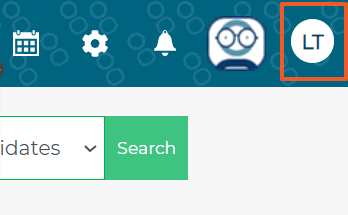
            After logging into your own Jobtrain user account, click the initials in the top right of the screen:


            The press User Settings, then expand Theme Detail.



            Choose which theme you want to use here – Light Mode or Dark Mode:


            Was this article helpful?

            That’s Great!

            Thank you for your feedback

            Sorry! We couldn't be helpful

            Thank you for your feedback

            Let us know how can we improve this article!

            Feedback sent

            We appreciate your effort and will try to fix the article

            X